Why a Monthly Net Worth Tracker Spreadsheet Matters
A monthly net worth tracker spreadsheet turns a vague sense of “how am I doing with money?” into a number you can watch over time. Instead of judging your finances by your checking account balance on any given day, you record everything you own and everything you owe once a month, and the spreadsheet does the subtraction for you. Tracking your net worth each month helps you get a clear view of your finances and can be extremely motivating as you build wealth [S2].
The appeal of doing this in a spreadsheet rather than an app is control. You decide which accounts count, how often you update values, and how much detail you want. A well-built tracker also becomes a historical record: twelve months of snapshots show whether your financial position is genuinely improving, staying flat, or quietly sliding backward even when your income looks fine.
What a Good Monthly Net Worth Tracker Includes
At its core, any net worth tracker needs two columns of information: assets and liabilities. Assets are what you own — cash, savings, investments, property, and anything else with resale or account value. Liabilities are what you owe — mortgages, car loans, student loans, credit card balances, and similar debts. Net worth is simply total assets minus total liabilities.
A practical monthly tracker usually goes beyond that basic math. Based on how dedicated net worth spreadsheets are typically structured, useful features include:
- Asset categories: liquid cash (cash, savings, and checking accounts), investments, and larger assets such as property or vehicles [S2].
- Liability categories: debt payments, mortgages, car loans, and other balances owed [S2].
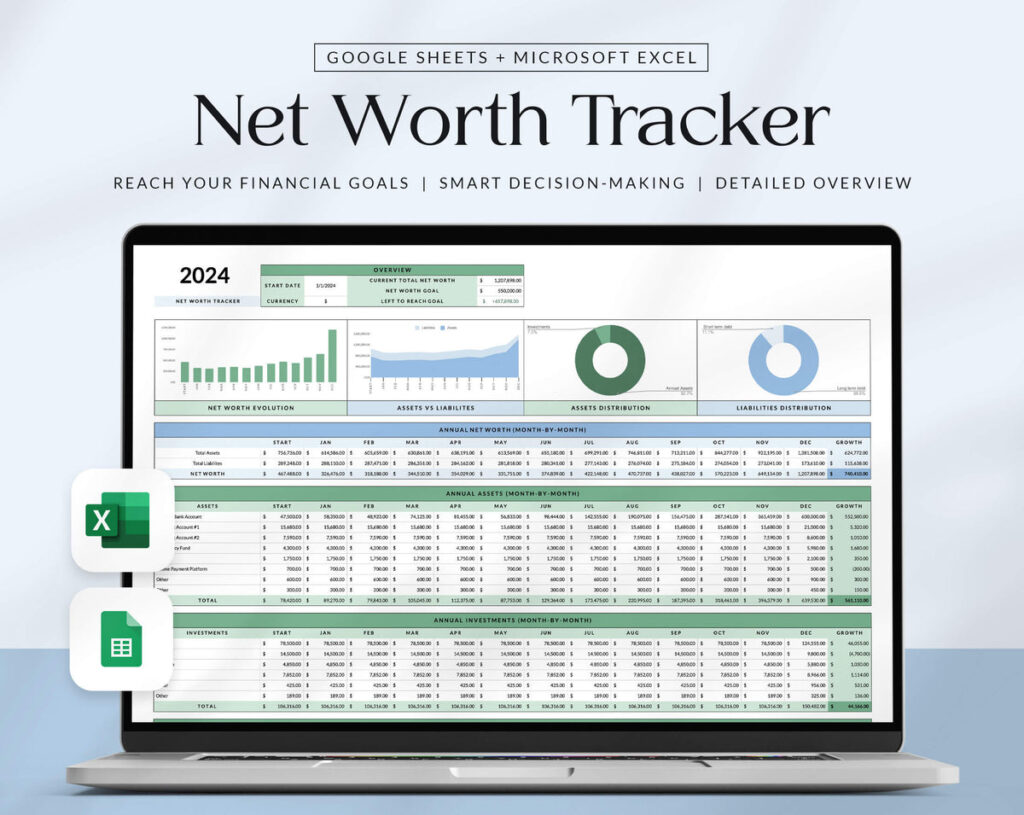
- Automatic net worth calculation: the spreadsheet totals your assets and liabilities and calculates your monthly net worth for you [S1].
- A 12-month view: a rolling tracker that lets you review your progress across the year at a glance [S1].
- Month-over-month growth: the spreadsheet can also calculate how much your net worth has grown each month [S2], which is often the most motivating number in the file.
- Reusability: a template you can duplicate and use year after year rather than rebuilding it annually [S1].
Some templates also include a dashboard or annual calculator view that summarizes the year’s data in one place [S1]. That is a nice-to-have rather than a requirement, but it helps if you want a quick visual of your trajectory.
How to Set Up Your Spreadsheet, Step by Step
You do not need a complex template to start. Whether you build your own or adapt a ready-made one, the setup follows the same logic.
- List your accounts and debts. Create one section for assets and one for liabilities. Under assets, include liquid cash (checking, savings, and physical cash), investment accounts, and any other significant holdings [S2]. Under liabilities, list every debt with a balance: mortgage, car loan, credit cards, student loans, and so on [S2].
- Create a column for each month. A common layout is one row per account and one column per month, so January through December sit side by side. This is the structure behind the 12-month tracker approach, which lets you review your financial progress clearly across the year [S1].
- Add totals and a net worth row. Use spreadsheet formulas to sum your assets and liabilities for each month, then subtract liabilities from assets. The spreadsheet automatically calculates your monthly net worth, so you never have to do the arithmetic by hand [S1].
- Add a monthly change row. A simple formula that subtracts last month’s net worth from this month’s shows your growth or decline each month [S2]. Seeing that figure move in the right direction is the payoff of the whole exercise.
- Decide on an update routine. Pick a fixed day each month — the first weekend, payday, or month-end — and update every balance. Consistency matters more than precision; a tracker updated on the same day each month gives you comparable snapshots.
A simple example of the structure might look like this:
| Category | Jan | Feb | Mar |
|---|---|---|---|
| Checking & savings | $8,000 | $8,600 | $9,100 |
| Investments | $22,000 | $22,800 | $23,500 |
| Car loan | –$9,000 | –$8,700 | –$8,400 |
| Credit cards | –$1,200 | –$900 | –$700 |
| Net worth | $19,800 | $21,800 | $23,500 |
The exact figures are illustrative, but the pattern is the point: each month’s column builds on the last, and the net worth row shows the trend without any manual math.
Practical Habits for Getting the Most From Your Tracker
The spreadsheet itself is only half the value; the habits around it do the rest. A few practical guidelines help:
- Update on the same day each month. Net worth fluctuates with market values and payment timing, so comparing snapshots taken at consistent intervals makes the trend more meaningful.
- Record values, not guesses. Pull actual balances from statements or account dashboards rather than estimating from memory.
- Keep the categories stable. If you add, remove, or rename categories mid-year, earlier columns become harder to compare. Note any changes so future you understands the history.
- Review the monthly change, not just the total. A flat month after a big gain is normal; what matters is the direction over several months.
- Duplicate rather than rebuild. When a new year starts, copy the template so you keep your history intact while starting fresh columns [S1].
It also helps to treat the tracker as a diagnostic tool, not a scoreboard. If your net worth is falling, the line items tell you why — rising credit card balances, a shrinking savings account, or investment declines — and that is where you can act.
Common Mistakes to Avoid
Most problems with a monthly net worth tracker spreadsheet come from inconsistency rather than bad math. Watch for these pitfalls:
- Tracking only assets. A growing investment account means little if debt is growing faster. Both sides of the ledger belong in the file [S2].
- Forgetting irregular or hidden liabilities. Annual bills, buy-now-pay-later balances, and informal loans you owe should be captured somewhere, even in a catch-all row.
- Double-counting. If you list a savings account and also a “cash” total that includes it, your assets will be overstated. Decide on one home for each dollar.
- Chasing precision. Rounding to the nearest dollar or even the nearest hundred is fine; the trend is what you are tracking, not a penny-perfect audit.
- Abandoning the file after a bad month. The months when your net worth dips are exactly when the tracker is most useful, because they show whether the dip is temporary or a pattern.
Where to Get a Template — and What to Check
You can build a tracker yourself in about fifteen minutes with a spreadsheet app, or you can start from a ready-made template. Dedicated options exist, such as a net worth tracker spreadsheet for Google Sheets that monitors assets and liabilities, calculates monthly net worth automatically, and includes a 12-month tracker you can reuse by duplicating the file [S1]. Other vendors offer similar templates that calculate monthly growth and break out categories like liquid cash, investments, debt payments, and liabilities [S2].
Whatever template you choose, check three things before relying on it: that the formulas actually calculate totals and month-over-month change correctly, that the category list matches your real accounts rather than forcing you into mismatched buckets, and how the file handles a new year. Details such as features, pricing, and availability can change, so verify the current specifics on the product page rather than assuming a description stays accurate indefinitely. The best tracker is ultimately the one you will actually update every month — a simple file used consistently beats a sophisticated one you open twice a year.
Sources for Editorial Review
These are relevant pages found during drafting, not proof that any claim has been verified. Review factual statements and citations before publication.
- Editorial source lead [S1]: Net Worth Tracker Spreadsheet for Google Sheets with Manvindra… (topmate.io)
- Editorial source lead [S2]: Net Worth Tracker Spreadsheet – Freedom In A Budget (freedominabudget.com)